 Một Studio AI dành cho Hình ảnh, Video & Chỉnh sửa
Bắt đầu miễn phí với PixelMind 2.0, sau đó chuyển sang GPT Image, Nano Banana, Seedream, Kling, Veo hoặc Seedance khi công việc cần nhiều hơn.
Bắt đầu miễn phí, mở rộng quy mô khi sẵn sàng
Một quy trình làm việc, bốn mức công suất rõ ràng
Quy trình làm việc video
Bắt đầu với công việc video mà người dùng thực sự cần
Video mang lại cảm giác cao cấp khi có điểm vào cụ thể. Chọn văn bản thành video, hình ảnh thành video, video sản phẩm, video quảng cáo hoặc video hình đại diện, sau đó bắt đầu bằng lời nhắc đã phù hợp với công việc.
Prompt to clip
Text to Video
PixelMind Video ProWrite a scene and create a short clip for ads, social posts or concept testing.
Bắt đầu quy trình công việc này
Still image to motion
Image to Video
Kling 3.0 TurboUpload a product, portrait or visual reference and add natural camera motion.
Bắt đầu quy trình công việc này
For ecommerce and launches
Product Video
Veo 3.1 FastCreate short ecommerce demos, marketplace clips and launch visuals from one prompt.
Bắt đầu quy trình công việc này
For social campaigns
Ad Video
Seedance 2.5Start a scroll-stopping product or service ad with a clear hook and benefit.
Bắt đầu quy trình công việc này
Presenter concepts
Avatar Video
PixelMind VideoDraft an avatar-style presenter clip for explainers, demos and landing pages.
Bắt đầu quy trình công việc này
Quy trình làm việc
Từ lời nhắc đến quảng cáo có thể sử dụng trong một quy trình tập trung
PixelMind được thiết kế để đưa ra các quyết định sáng tạo nhanh chóng: tạo, so sánh, cải thiện và sử dụng lại kết quả mà không cần phải xây dựng lại thiết lập của bạn.
Write the result you want
Describe a product shot, portrait, social post, logo, room design or cinematic scene in plain English.
Choose the right path
Use free PixelMind 2.0 Slow Mode, spend credits on a premium model, upload a reference, or open a template when you need a repeatable style.
Refine, animate or export
Download the image, remove the background, upscale it, edit it, or turn it into a short AI video.
Cách thức hoạt động của không gian làm việc
Một đường dẫn rõ ràng hơn từ lời nhắc đến hình ảnh hoàn thiện.

Commercial image workflow
Start with the real product, then build the campaign around it.
Upload a product photo, preserve the product, then choose a clean listing, ad or social direction. The model, reference-image limit and cost stay visible before you create.
Open product photo workflow
Controlled video workflow
Turn a still idea into a short clip with the right video model.
Select a model for its actual strengths, then set only the lengths, resolution and audio options that model supports. Create a quick draft first, then move up when quality matters.
Open Seedance 2.5 workflow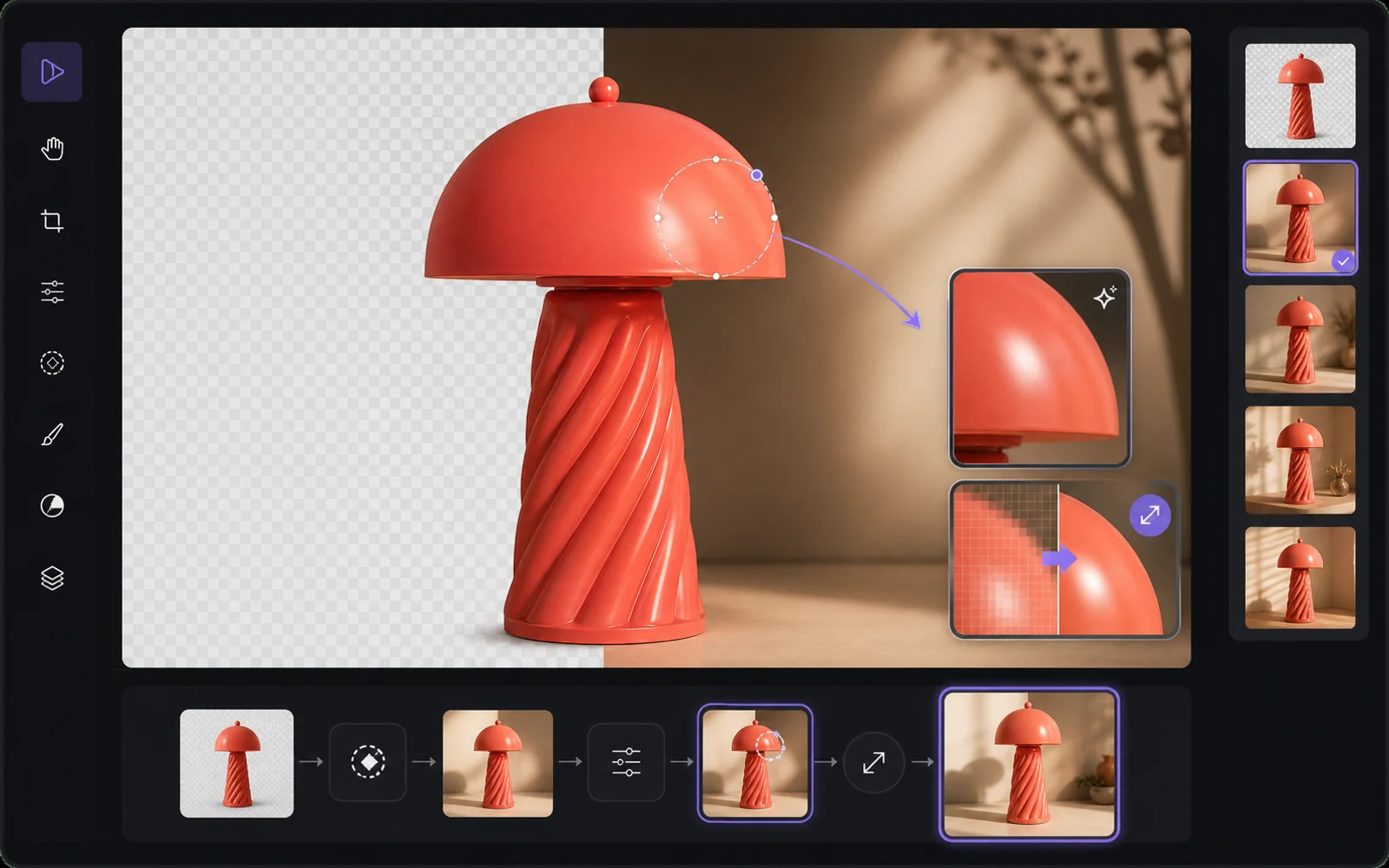
Finish the useful version
Improve the result without starting from zero.
Reuse a result as a reference, remove the background, upscale it or make a targeted edit. PixelMind keeps the next step close to the result instead of sending people back to an empty prompt box.
Open image editorTại sao PixelMind
Trình tạo hình ảnh AI thực tế dành cho những người truyền tải hình ảnh
PixelMind AI kết hợp các kiểu chuyển văn bản thành hình ảnh, hình ảnh thành video, chỉnh sửa ảnh AI và các phong cách có thể tái sử dụng trong một ứng dụng web tập trung.
Create without setup
Start from a prompt, a reference image or a ready-made template. No model setup, plugin chain or prompt engineering required.
One workspace for image and video
Generate images, animate stills, create video from text, remove backgrounds and upscale results without leaving the same flow.
Built for real projects
Use PixelMind for product photos, social posts, thumbnails, portraits, concept art, ads and client-ready visual drafts.
Fast iteration
Try variations quickly, remix gallery prompts and reuse your own results as references for the next image or video.
Clear upgrade path
Start in free Slow Mode, then move to Pro, Ultimate or Max for more credits, cleaner exports and commercial use.
Privacy-aware by design
Guest results are temporary, signed-in users control their history, and generation flows avoid surprising credit charges.
Được xây dựng cho kết quả
Tạo hình ảnh mà mọi người thực sự có thể sử dụng
PixelMind không chỉ là một hộp nhắc nhở. Nó kết nối việc tạo, chỉnh sửa, video và các mẫu để khách truy cập có thể chuyển từ sự tò mò sang kết quả có thể sử dụng được.
Marketing teams
Create ad concepts, product angles, campaign visuals and social posts before booking a full shoot.
Creators
Turn rough ideas into thumbnails, profile images, short videos, covers and repeatable visual styles.
Small businesses
Generate clean product photos, remove backgrounds and test visual ideas without hiring a design team first.
Một không gian làm việc được kết nối
Giữ cho mỗi dự án luôn chuyển động
Bắt đầu bằng lời nhắc hoặc tài liệu tham khảo, so sánh kết quả, sau đó chỉnh sửa, nâng cấp, xóa nền hoặc tạo hiệu ứng cho kết quả mà không cần xây dựng lại dự án của bạn trong một ứng dụng khác.
Bắt đầu từ một công việc
Trình tạo AI phổ biến cho công việc thực tế
Chọn công việc bạn cần hoàn thành, mở công cụ tập trung phù hợp, sau đó tinh chỉnh kết quả trong Studio mà không cần phải xây dựng lại thiết lập của mình.
Product photos
Create clean product shots, lifestyle scenes and ad visuals from a short prompt.
Professional headshots
Turn a casual portrait into polished profile photos for LinkedIn, teams and resumes.
Image to video
Animate still images into short clips for social posts, ads and creator experiments.
Logo ideas
Explore logo directions, icons and brand marks before refining the final concept.
Room redesign
Preview interior styles and layout ideas from a room photo or written direction.
Background remover
Remove backgrounds from product, portrait and marketplace images in one step.
Bắt đầu nhanh
Chọn một mô hình và Thử ngay bây giờ
Nhảy thẳng vào mô hình AI yêu thích của bạn. Không cần thiết lập.

Seedream 5.0 Pro
Vivid color and strong artistic depth

PixelMind 2.0 Pro
Ultra-detailed, brand-ready visuals

GPT Image 2
Precise prompts and clean text rendering
Kling 3.0
4K cinematic video with long clips
Veo 3.1 Pro
Native audio and cinematic 4K output

Nano Banana 2
Character consistency and smart edits
Bắt đầu miễn phí
Bắt đầu miễn phí, sau đó mở rộng quy mô mà không cần thay đổi công cụ
Sử dụng PixelMind 2.0 Slow Mode không cần thẻ. Pro bắt đầu từ $20/tháng khi bạn cần xuất sạch, sử dụng cho mục đích thương mại và nhiều dung lượng hình ảnh hoặc video hơn.